Maze Linux 2026.10.26: Qlam 2, Maze Wallpaper and gaming out of the box
· 2026.10.26
A rebuilt Qlam with real-time protection, Maze Wallpaper with live wallpapers and media mode, the new Maze Store, gaming defaults, phone-fingerprint unlock and sudo approval in Maze Connect, a second round of security fixes, a Secure Boot recovery path, new apps in the repository, and Linux 7.2.11.
Last release was about fixing what was already there. This one adds things: Qlam is rebuilt around a system service with real-time protection, the desktop gets Maze Wallpaper with live wallpapers and synced lyrics, Steam games start faster thanks to new gaming defaults, and your phone can now unlock the computer. Alongside that comes a second round of security fixes across Maze's apps, and Linux 7.2.11.
Highlights
- Qlam 2.0: a new antivirus service with real-time protection that warns instead of getting in your way.
- Maze Wallpaper: live wallpapers, your own videos, and a media mode with synced lyrics. It's the new default desktop.
- Maze Store: every Maze app in one place. Browse them, read what each one does and install it from a single window.
- maze-gaming: faster Steam shader compilation, bigger shader caches, GameMode, MangoHud and gamescope out of the box.
- Maze Connect 1.5: unlock the computer and approve
sudowith your phone's fingerprint. - Maze AI 1.23: redesigned interface, a Quick Ask command bar, personalities and command rules.
- AI Usage widget: plan limits for Claude, Codex, Gemini, Copilot and OpenCode in the panel.
- Second security round in Maze Cloak, Maze Guard, HazeDrop, Haze, Entropy Shield, Maze AI, Qlam, Linux Chan AI, Secure Boot and the installer, including a privilege escalation fix in Maze Cloak.
- Secure Boot recovery path: new boot entries that work without shim, for the day shim itself breaks.
- New in the Maze repository: Gaze, Maze Crypto, the Coin Tracker widget and Ledger Live.
- OpenSnitch and KDE Connect are no longer part of the default install.
Qlam 2.0
Qlam has been rewritten. Scanning now happens in qlamd, a system service written in Rust, and the window is only a client that shows what it found. That means protection keeps working when the window is closed.
- Real-time protection for the places a normal user can write to: your home folder,
/tmp,/dev/shmand USB drives. - Linux-focused detection: YARA rules written for Linux executables and MalwareBazaar samples that can actually run on Linux. Fewer false alarms from Windows signatures.
- It warns, you decide: by default Qlam never deletes, blocks or moves a file. Each finding comes with a short explanation and two choices: quarantine or trust.
- False alarms are treated as bugs: when a rule is fixed, the findings it raised are withdrawn automatically, and findings for files that no longer exist are closed.
- It stays out of the way: no program ever waits for Qlam, scans run at idle priority, and CPU, disk and memory use is capped.
- New logo and its own title bar.
Maze Wallpaper
Maze Wallpaper is a new Plasma wallpaper plugin plus an app to manage it, and it's now the default on every Maze desktop.
- Still images, GIFs and looping videos, including your own videos.
- Active blur: the desktop blurs when a window has focus.
- Media mode: what you're listening to appears on the desktop, with synced lyrics and a corner widget.
- New wallpaper set: OLED stills (Prism, Flow, Trace, Field, Signal, Dawn) and live wallpapers (Pulse, Rain, Orbit, Scan, Depth, Wave, Dust, Neon, Caustics, Weave, Radar). Maze Dust is the new default wallpaper and lock screen.
Maze Store
Maze Linux now comes with its own app store. Maze Store lists every app in the signed [mazelinux] repository by category: you can browse them, read what each one does, and install, update or remove it from one window. Apps published to the repository show up in the store on their own.
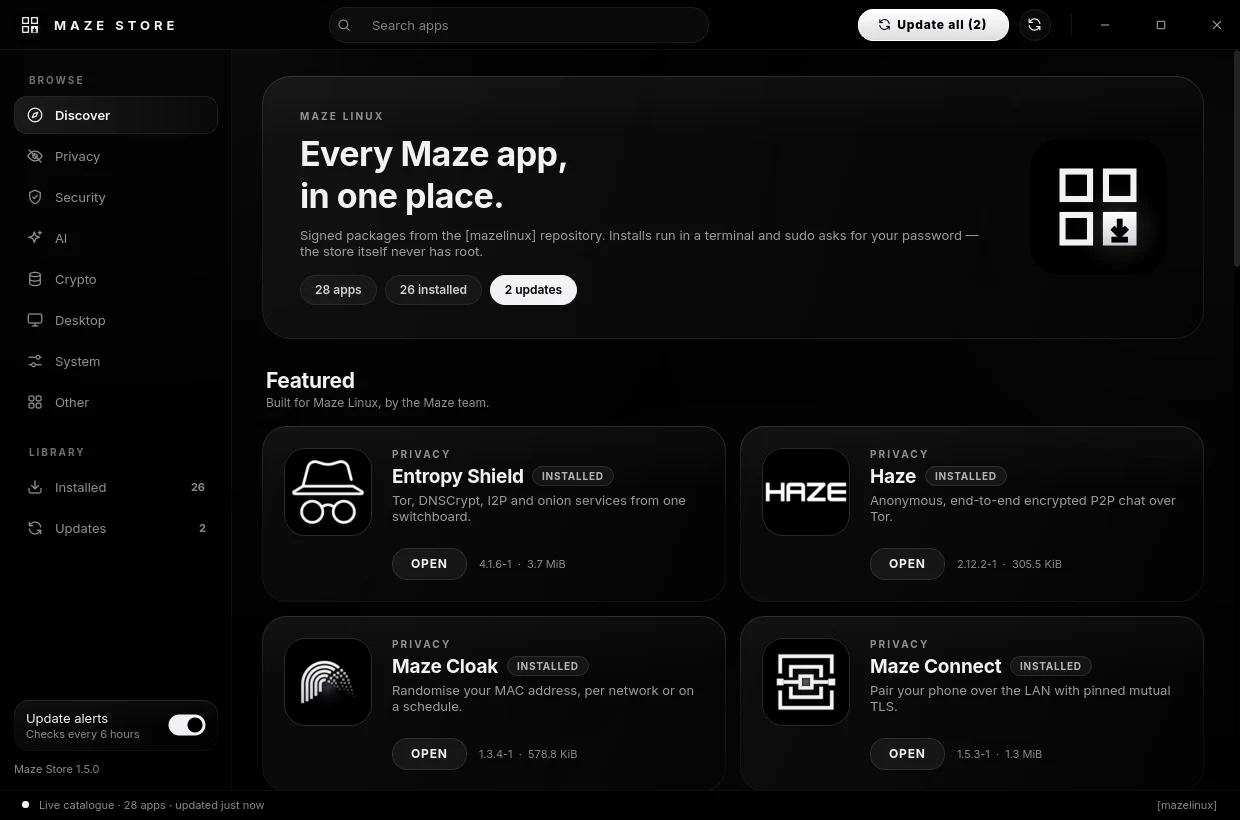
- The store never has root. Every install, update or removal opens in a terminal window, so you see the exact
pacmancommand and type your password intosudo, never into the store. - No partial upgrades: installing runs
pacman -Syu --needed, notpacman -S, so a new app never leaves the rest of the system behind. - Update alerts: a background check runs a few hours apart and posts one notification when Maze apps have updates. It never installs anything by itself, and you can turn it off in the store.
Gaming
The new maze-gaming package brings the tuning that gaming-focused distributions ship, without loosening Maze's security outside a running game.
- "Processing Vulkan shaders" no longer takes hours: Steam pre-compiles shaders on all CPU threads (capped by RAM so small laptops don't start swapping).
- Shaders stop recompiling on every launch: the NVIDIA and Mesa shader caches are much larger.
- GameMode switches to a gaming scheduler (sched_ext) only while a game runs, plus
ntsync, MangoHud and gamescope. - Works on every GPU and kernel; parts your system can't use are skipped.
- NVIDIA: Maze now installs Arch's prebuilt
nvidia-opendriver instead of building it with DKMS on every kernel update.
maze-gaming status
Maze Connect
- Fingerprint unlock (1.5.3): unlock the computer from your phone. The phone's biometric key signs a fresh challenge for this computer only.
sudoand polkit approval: approve password prompts on your phone. The terminal shows a two-digit code that's never sent over the network, and SSH sessions are left alone. It's opt-in per phone and nothing is enabled on install.- Lock your phone from the computer, and an activity history of what paired devices did.
- Earlier in the month: remote control, presenter mode, clipboard sync, a shared folder with previews, find my phone and sending text from the phone.
- Pairing is stricter: a repeated pairing response is rejected, and names sent by the other device are shown as plain text.
Maze AI
- New interface with keyboard shortcuts, and Quick Ask redesigned as a command bar with threads.
- Personality settings and command rules.
- Small local models are much more reliable at using tools, and an attached folder becomes the chat's working folder.
- Stricter safety: sensitive paths are checked after resolving globs, variables and symlinks, more persistence and exfiltration patterns are caught, and every redirect of a web fetch is checked.
Security fixes
- Maze Cloak 1.3.3: fixes a privilege escalation. A local user in the
mazegroup could plant a symlink at Cloak's config file, and the next upgrade handed the file it pointed to (for example/etc/shadow) to the group. The root daemon's fixed temporary file names allowed a similar file overwrite. All writes are now atomic and symlink-safe, a malformed config can't crash the daemon any more, and the polkit rule only allows start, stop and restart. Also fixed: unticking every interface no longer means "rotate all of them", and "Rotate now" respects the pause while a VPN is up. - Maze Guard 2.20: auto-block only fires when the attacker's Ethernet address matches the kernel's own ARP entry, DHCP servers count as infrastructure, at most 5 auto-blocks per hour, and your DNS server can't be blocked without asking. New interface and more accurate notifications.
- HazeDrop 1.5.2: password-less shares now need proof of the link key to download, and Tor's control port uses cookie authentication.
- Haze 2.12.2: password guessing is throttled for both TCP and web joins (lockout after 20 failures in 10 minutes).
- Entropy Shield 4.1.6: a config file read by root must belong to the user who asked.
- Qlam 2.0.3: trust and restore decisions only apply to the user who made them, and folder scans stay inside your home.
- Linux Chan AI 1.1.5: the sandbox now hides the session bus, the agent sockets and the display.
- Panic and kill switches: the system broker only obeys the user at the active local session; SSH and cron are refused.
- Installer 2.1.1: AUR apps are built without a password-less
sudorule, and the live session's temporary permissions are verified gone after install.
Secure Boot
- A way back in if shim breaks (2.0.2): two new boot entries, "Maze Linux (no shim, Secure Boot off)" and the same for the recovery kernel. If shim is ever revoked or damaged, turn Secure Boot off in the firmware and boot from them. With Secure Boot on, the firmware skips them. They reuse the existing files, so they take no extra space, and
maze-boot-checkreports whether they exist. - No more false "do NOT reboot": a third-party kernel-install plugin made every kernel update end with "FAILED", even though the new boot image was installed and signed. Maze now checks that the image reached the boot partition and reports the plugin as a warning instead.
- Only boot images built for an installed kernel get signed (2.0.1).
maze-sb-rotate-keyrotates your Secure Boot signing key in stages.
Maze tools
- maze-hardware and maze-kernel have been redesigned with the OLED look (maze-tools 2.1.5).
- Maze Cloak has a new app and tray icon.
- Maze apps now show a small "for Maze Linux" tag, and the app logos share one icon style.
- The installer media now includes
linux-lts-headers, so Broadcom Wi-Fi also works on the recovery kernel.
New in the Maze repository
These aren't installed by default. Install them with sudo pacman -S <name>:
gaze: checks what your machine reveals to the network: your real IP, DNS, IPv6 and WebRTC leaks, traffic interception, and how the system is configured. The desktop edition of gaze.berkkucukk.com.tr.maze-crypto: a read-only crypto price, portfolio and DCA tracker. It never trades and never asks for exchange API keys, private keys or seed phrases. It reads the accounts on a Ledger in one session, follows HD accounts from an xpub, and supports Monero view-only wallets: blocks come from onion nodes over Tor and your outputs are found on your own computer, so no node ever sees your view key.plasma6-applets-coin-tracker: live coin prices, 1h / 24h / 7d change and a 7-day chart in the panel. Data comes from CoinGecko, no account needed.ledger-liveandledger-udev: Ledger's desktop app and USB rules. The app's own updater is removed, so updates come throughpacman.
Package changes
- Added by default:
maze-store,maze-gaming(with GameMode, MangoHud and gamescope),maze-wallpaper, the AI Usage widget (installed, not on the panel),linux-lts-headers. - Removed from the default install: OpenSnitch, KDE Connect (Maze Connect replaces it).
| Component | 2026.09.26 | 2026.10.26 |
|---|---|---|
| Linux | 7.2.7 | 7.2.11 |
| Linux LTS | 6.18.54 | 6.18.57 |
| systemd | 262 | 262.1 |
| PipeWire | 1.6.9 | 1.6.10 |
| Firefox | 156.0.1 | 158.0.1 |
| Thunderbird | 156.0 | 158.0 |
| Ollama | 0.34.4 | 0.40.8 |
| Tor | 0.4.9.13 | 0.4.9.14 |
| SOF firmware | 2026.09 | 2026.09.2 |
Upgrading
Already on Maze? Update as usual; maze-gaming and Maze Wallpaper come in with it:
sudo pacman -Syu
sudo maze-selftest
The 32-bit GameMode and MangoHud parts need [multilib], so they aren't pulled in automatically. If you play on Steam:
sudo pacman -S lib32-gamemode lib32-mangohud gamescope
The update stops OpenSnitch and removes its tray icon, but it doesn't uninstall OpenSnitch or KDE Connect. If you don't use them:
sudo pacman -Rns opensnitch kdeconnect
New installs: the ISO is 5.1 GB (mazelinux-2026.10.26-x86_64.iso). Download it here.
Maze Linux is ad-free and telemetry-free, and it runs on donations. Support the project