Hardware Kill Switches
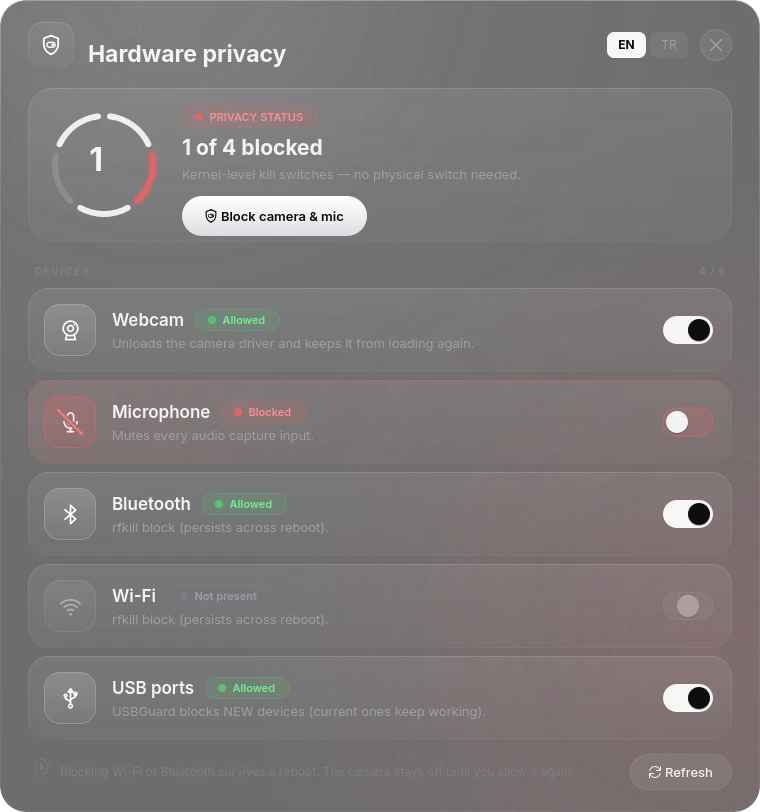
The Maze Hardware application has kill switches for the camera, microphone, Bluetooth, Wi-Fi and USB. Block camera & mic at the top flips the two most common ones at once; the counter shows how many devices are blocked. They work below the application level, so a program cannot talk its way around them:
| Switch | What "off" does | Survives a reboot? |
|---|---|---|
| Camera | Blacklists the uvcvideo / gspca_main drivers and unloads them | Yes |
| Microphone | Mutes the default input in PipeWire (and ALSA capture) | Usually — the mute state is restored |
| Bluetooth | rfkill block bluetooth | Yes (systemd-rfkill keeps it) |
| Wi-Fi | rfkill block wifi | Yes (systemd-rfkill keeps it) |
| USB | Turns on USBGuard with an allow-list of the devices plugged in right now; anything new is blocked | Yes, until you switch it back on |
The same switches are available from the shell (maze-killswitch status,
maze-killswitch camera off) and from your phone through
Maze Connect. The privileged work is done by the maze-guardd
broker, which only accepts requests from a user sitting at the machine — not
from SSH or a background process.
The camera switch is persistent
Turning the camera off stays off across reboots. The driver is blacklisted
(/etc/modprobe.d/maze-killswitch-camera.conf), which means no application can
see the camera until you turn it back on in Maze Hardware — or by hand:
sudo rm /etc/modprobe.d/maze-killswitch-camera.conf && sudo modprobe uvcvideo
This is the intended behaviour, and it is also the single most common source of "my camera stopped working" reports.
"My camera / microphone isn't working — what did I do?"
Run this first:
sudo maze-doctor
Its Hardware section answers it:
- Camera — if the Maze kill switch is on, it says so explicitly ("Camera is disabled by the Maze killswitch") and prints the command that turns it back on. If there is no blacklist and no camera device, the cause is not Maze: check a physical shutter (many ThinkPads have one), a BIOS/firmware setting, or a hardware fault.
- Microphone — it reports that capture is muted, but cannot say who
muted it: a microphone mute leaves no record on disk, and the Fn mute key, an
ALSA default and Maze Hardware all produce the same state. Unmute with
amixer -c 0 set Capture cap unmute, or flip the switch in Maze Hardware.
Panic mode
Ctrl+Alt+P (or the Maze Panic item in the system tray) is the emergency button. In this order it:
- turns networking off in NetworkManager,
- locks the screen,
- blocks the Wi-Fi and mobile radios and wipes the system journal and the main system logs (including the audit log) — Bluetooth stays on so a Bluetooth keyboard keeps working,
- clears your shell histories, recent-files lists, thumbnails and clipboard (a terminal that is still open may write its history back when it closes).
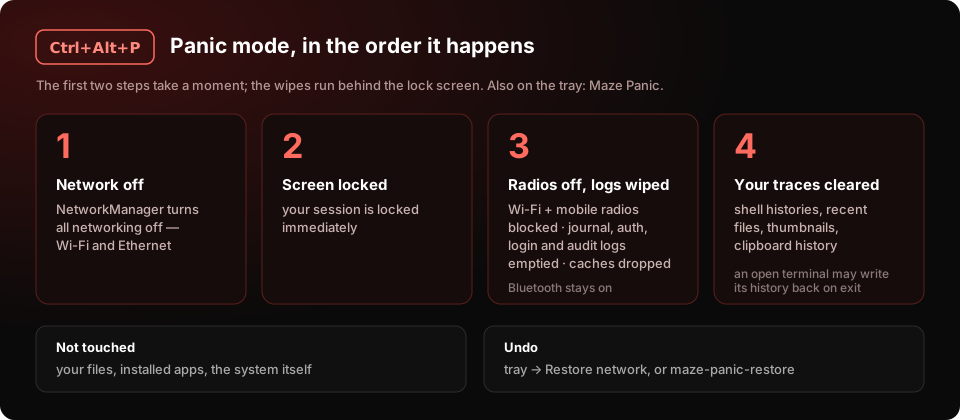
It does not delete your files or damage the system. Bring the network back
with Restore network in the tray widget or maze-panic-restore.
maze-panictakes no options — runningmaze-panic --helptriggers panic mode. Use the tray widget's restore, not a reboot, to undo it: the radio block survives reboots.
USB protection
USB device blocking (USBGuard) is off by default, and switching it on is a deliberate choice you make in Maze Hardware.
It is off by default on purpose: blocking new USB devices by default means a newly plugged-in keyboard or mouse does not work, which for most people reads as a broken computer rather than a security feature. Turn it on when you want that protection and understand the trade-off.
See also: Diagnostics · Privacy Reference