Tools & Apps
Every application that ships with Maze Linux is listed here. Tools are grouped by category.
Maze-Built Tools
These utilities were developed specifically for Maze Linux.
maze-control-center
An OLED-styled PySide6 dashboard showing the live state of your system at a glance.
- Tabs for Security, Privacy, AI, and Maintenance.
- Shows whether AppArmor, the firewall, auditd, and Maze Guard are active.
- Shows MAC randomization status and current interface MACs.
- Shows whether Ollama is running and which models are available.
- All privileged actions are shown as copyable terminal commands — nothing runs automatically.
maze-control-center
maze-welcome
A first-boot greeter that opens once after install to orient new users. Self-removes its autostart entry after first launch.
Install Maze Linux (Calamares)
The guided graphical installer, launched from the icon on the live desktop. It handles partitioning, LUKS encryption, users and the signed boot chain. See the Installation Guide.
QLAM
A modern antivirus GUI built on top of ClamAV. Provides:
- On-demand directory and file scanning.
- Virus definition database updates.
- Scan history and quarantine management.
Launch from the application menu or run qlam.
Entropy Shield
A one-click anonymity layer. Activates Tor + DNSCrypt-proxy + I2P simultaneously, routing all traffic through the anonymity stack with a single command.
entropy-shield --help
Haze
A Tor-based onion messenger using the Haze Protocol — a Maze-native encrypted messaging system that routes all communication over the Tor network. Messages never pass through a central server.
haze --help
HazeDrop
Anonymous file and text transfer over Tor. Send files or text snippets without revealing either party's IP address. The transfer happens entirely over Tor hidden services.
hazedrop --help
sentinai — not installed by default
PassGen / OSINT tooling aimed at authorised penetration testing. It is not a background security monitor, and it has a Gemini cloud path — so it is not private by default. Deliberately excluded from the default install.
sentinai
Maze AI
Maze's own desktop AI assistant (PySide6), built on Ollama — installed by
default as part of maze-meta. It is agentic: it can read your clipboard,
files and directories, shell history and screenshots to answer questions and
carry out tasks. Turkish is a first-class language, not a translation.
maze-ai
All inference goes through your local Ollama instance.
linux-chan-ai — not installed by default
A chat assistant with a terminal UI.
Privacy warning — read before installing. Linux Chan has no offline mode. It reads files and screenshots on your behalf, and everything it sees is sent to Google. It is deliberately excluded from the default install. If you want a local, private assistant, use Maze AI above.
linux-chan-ai
Maze Cloak
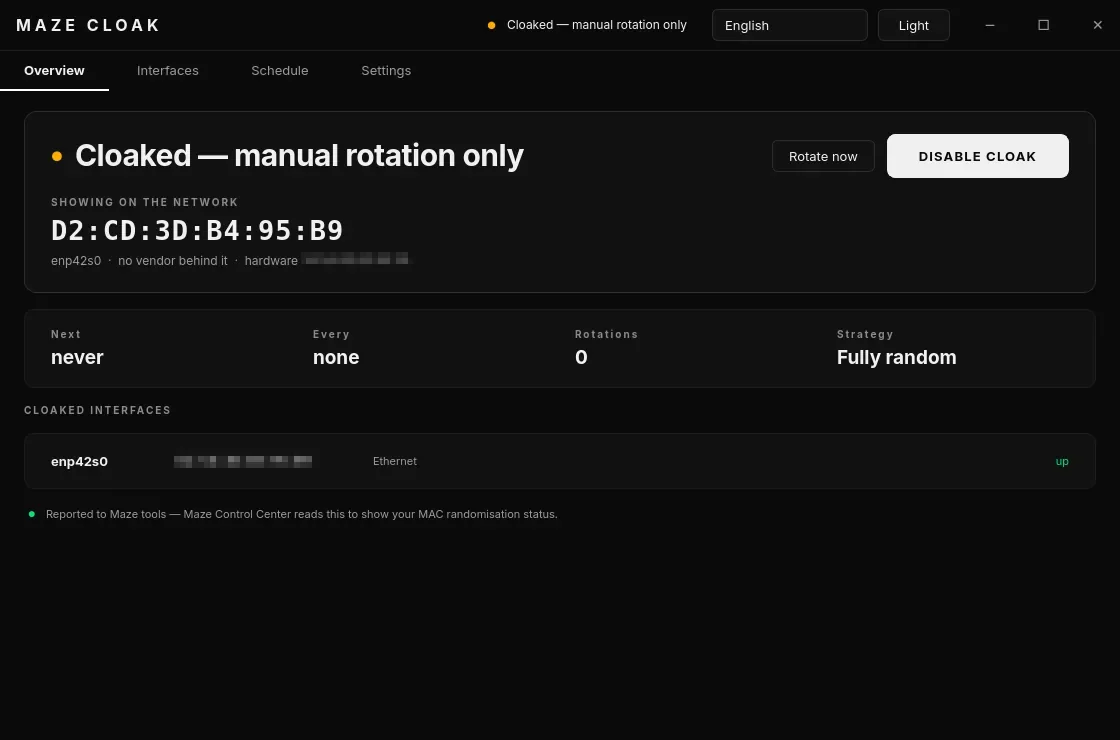
Randomises your network adapter's MAC address, and can rotate it on a schedule. Even networks you never join cannot track your device across visits.
MAC address cloaking: scan randomisation, per-connection randomisation and scheduled rotation, with VPN-aware pausing. Tray-first PyQt6 interface (English / Turkish).
Enable it, and set the rotation interval, from Maze Control Center's Privacy tab. See the Privacy Reference.
systemctl status maze-cloak
Firefox
The default browser. Ships with a hardened profile: telemetry off, tracking and fingerprint protection on, DNS-over-HTTPS enabled. No configuration needed.
Brave
Not on the ISO — available from the AUR:
paru -S brave-bin
Privacy-focused Chromium-based browser with built-in ad blocking and Brave Shields. Good alternative when Firefox compatibility is an issue.
Mullvad Browser
Not on the ISO — available from the AUR:
paru -S mullvad-browser-bin
Based on Tor Browser's hardened engine but designed to use with a VPN. Minimal fingerprinting surface.
Tor Browser
Routes all traffic through the Tor anonymity network. Use for maximum anonymity. Launch via torbrowser-launcher which fetches and verifies the official bundle.
Communication & Messaging
Session
An end-to-end encrypted private messenger with no phone number required. Decentralized network, no central servers storing metadata.
Discord
The popular voice/text/community platform. Included for convenience.
Thunderbird
Full-featured email client with PGP/S-MIME support via the built-in OpenPGP manager.
Productivity
ONLYOFFICE
Not baked into the ISO — the installer fetches it from the AUR during installation (needs network). If that failed, run
maze-aur-setup.
A full office suite compatible with Microsoft Office formats (.docx, .xlsx, .pptx). Available via Flatpak.
Joplin
An open-source, end-to-end encrypted note-taking app with Markdown support and optional sync (Nextcloud, Joplin Cloud, self-hosted).
KDE Apps
| App | Purpose |
|---|---|
| Dolphin | File manager with split-pane, tabs, and Btrfs integration |
| Kate | Advanced text editor with split view and LSP support |
| Okular | PDF and document viewer |
| Gwenview | Image viewer |
| Ark | Archive manager (zip, tar, 7z, rar) |
| KCalc | Scientific calculator |
| KFind | File search |
| KWallet Manager | Credential/secret storage |
| Filelight | Disk usage visualization |
| KDE Partition Manager | Disk and partition management |
| KDE Connect | Phone ↔ desktop integration |
Security Tools
ClamAV + QLAM
ClamAV 1.4.1 is the open-source antivirus engine. QLAM is the Maze GUI on top. On-access scanning and scheduled definition updates are configured out of the box.
sudo freshclam          # update definitions
sudo clamscan -r /home  # CLI scan
rkhunter
Rootkit detection scanner. Run periodically:
sudo rkhunter --update
sudo rkhunter --check
lynis
Security auditing tool that scores your system configuration and suggests improvements:
sudo lynis audit system
Wireshark
Full GUI network protocol analyzer. Your user is in the wireshark group by default so you can capture without sudo.
nmap
Network scanner for host discovery and port scanning:
nmap -sV 192.168.1.0/24
aircrack-ng
Wi-Fi security testing suite (monitor mode, packet capture, WPA handshake testing). Use only on networks you own or are authorized to test.
Maze Guard
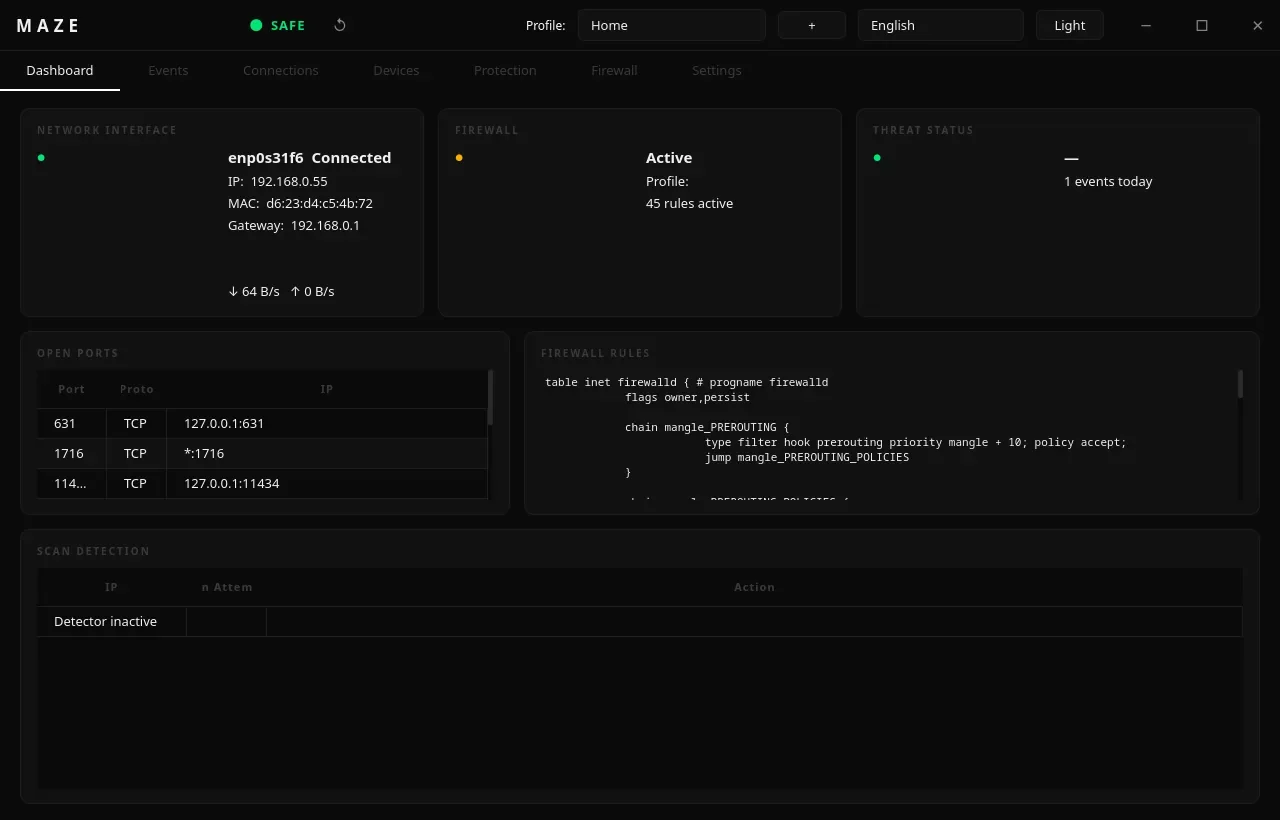
Maze's own public Wi-Fi security monitor (PyQt6 GUI + maze-guardd.service):
MITM/ARP-spoof detection, rogue gateway detection, packet analysis, firewalld
integration. Autostarts on the desktop.
maze-guardctl          # CLI
systemctl status maze-guardd
Privacy Tools
Encrypted DNS (via Entropy Shield)
Maze does not ship a standalone dnscrypt-proxy service. Encrypted DNS is
one of the layers Entropy Shield can turn on, together with its Tor
transparent proxy and I2P options — it is started by you, not at boot.
The system resolver out of the box is systemd-resolved.
See Entropy Shield.
Tor + OnionShare
tor— the Tor daemon. Runs as a SOCKS5 proxy on port 9050.onionshare— securely share files or host a hidden web service over Tor.
Mullvad VPN
Not on the ISO — available from the AUR:
paru -S mullvad-vpn-bin
ProtonVPN is installed by default (
proton-vpn-gtk-app).
The Mullvad VPN client. Accepts anonymous payment and keeps no logs. WireGuard and OpenVPN protocols supported.
ProtonVPN
A GUI client for the ProtonVPN service (subscription required). WireGuard and OpenVPN protocols supported.
WireGuard
The modern VPN protocol. Set up custom connections with:
sudo wg-quick up /etc/wireguard/wg0.conf
VLC
Universal media player supporting nearly every format.
Spotify
Not on the ISO — available from the AUR:
paru -S spotify-launcher
The official Spotify client via spotify-launcher.
PipeWire
The audio stack — handles audio and video routing. Replaces PulseAudio and JACK with a single compatible layer. Configured automatically.
System Utilities
btop
A modern, interactive resource monitor showing CPU, memory, disk, and network usage in the terminal.
btop
fastfetch
Displays a Maze-branded system summary at shell startup.
fastfetch
Btrfs Assistant
GUI tool for managing Btrfs subvolumes and snapper snapshots.
Bitwarden
Open-source password manager with browser extension and desktop app.
FileZilla
Full-featured FTP/SFTP/FTPS client.
Distrobox
Run containers that use another distro's package manager while sharing your home directory and display:
distrobox create --name ubuntu --image ubuntu:24.04
distrobox enter ubuntu
fwupd
Firmware update client for BIOS, UEFI, NVMe, and peripheral firmware from the Linux Vendor Firmware Service (LVFS).
Virtualization
Virtualization (not preinstalled)
Virtualization is not installed by default — this is deliberate, to keep the ISO lean. The whole KVM stack is one command away:
sudo pacman -S qemu-desktop libvirt virt-manager edk2-ovmf
sudo systemctl enable --now libvirtd
sudo usermod -aG libvirt,kvm "$USER"   # log out and back in
If you prefer VMware Workstation, Maze ships a helper that sets it up for you:
maze-install-vmware
paru
The AUR helper. Wraps pacman and lets you install from both official repos and the AUR:
paru -S <package>   # install
paru -Syu           # system update including AUR
paru -Ss <keyword>  # search
base-devel
The full Arch build toolchain: gcc, make, binutils, fakeroot, patch, etc. Required to compile AUR packages.
Python + pip
Python 3 with pip and python-setuptools preinstalled. The Maze tools themselves are written in Python.
Node.js
Not on the ISO — install it yourself:
sudo pacman -S nodejs npm
Node.js for JavaScript and TypeScript development:
node --version
npm install
Rust (rustup)
Not on the ISO — install it yourself:
sudo pacman -S rustup
The Rust toolchain is managed via rustup:
rustup show
cargo new my-project
Go
The Go toolchain is preinstalled:
go version
go build ./...
Flatpak + Flathub
Sandboxed app distribution. Flathub remote is configured out of the box. Install additional apps via flatpak install flathub <id> or through KDE Discover.
Also on the ISO
Installed by default but not covered above.
Maze applications
| App | What it is |
|---|---|
| Maze AI | Local AI assistant (see AI & Development) |
| Maze Connect | Phone ↔ desktop pairing (see Maze Connect) |
| Maze Guard | Wi-Fi attack monitor (see Maze Guard) |
| Entropy Shield | Anonymity stack (see Entropy Shield) |
| Said360 | Plasma applet (plasma6-applet-said360) |
| Firejail | Application sandboxing — firejail <program> to run something confined |
| mazelinux-keyring | Signing keys for the [mazelinux] repository |
Security and recovery
clamtk (second ClamAV GUI) · tpm2-tools, tpm2-tss (TPM) ·
libfido2, sequoia-sq, openpgp-card-tools (FIDO2 / hardware keys and
OpenPGP) · clonezilla, testdisk, ddrescue, fsarchiver, partclone,
partimage, gpart (disk rescue toolkit)
Desktop and shell
konsole, yakuake (drop-down terminal), irssi, mc (Midnight Commander),
plymouth (boot splash), steam + 32-bit Vulkan libraries (gaming),
claude-code, tesseract-data-tur (Turkish OCR)