If the System Won't Boot
Work through these steps from the top. Most boot problems are solved by step 1.
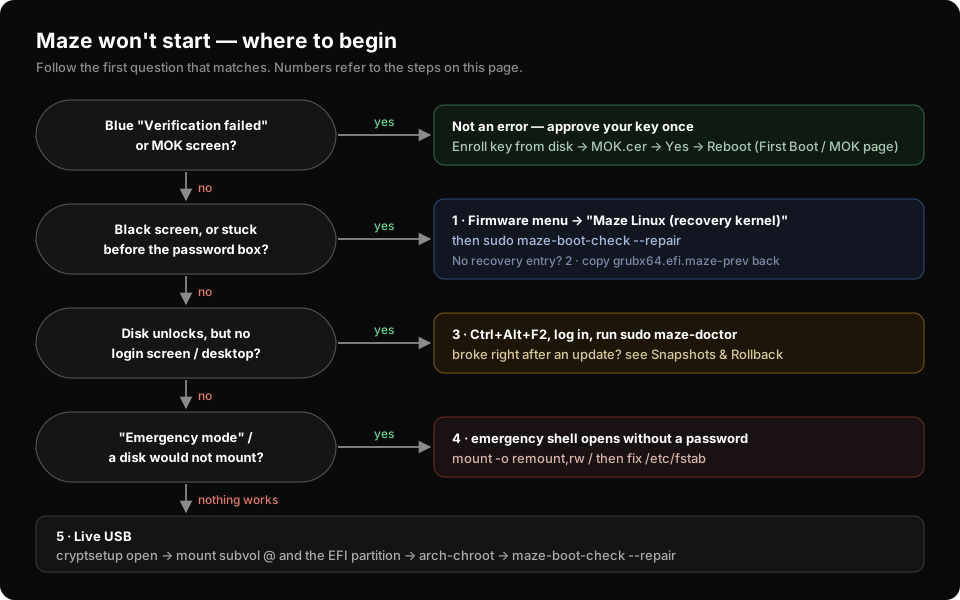
Before anything else: a machine that will not boot is almost never unrecoverable. Maze keeps a second, independent kernel installed and signed at all times precisely for this situation.
Step 1 — Boot the recovery kernel
At power-on, open the firmware boot menu — F12 on most machines, sometimes F11, F9 or Esc — and choose:
Maze Linux (recovery kernel)
This boots the LTS kernel. If a bad update broke the current kernel, this entry will still work, because it is a separate kernel image that the update did not touch.
Once you are back at a desktop, repair the boot chain:
sudo maze-boot-check --repair
Step 2 — Restore the previous kernel image
If there is no recovery entry in the menu, restore the previous signed image
by hand — from a shell on the installed system if you can still reach one
(Steps 3–4), otherwise from the live USB after mounting the disk (Step 5; the
EFI partition is then under /mnt/boot):
Despite the name,
grubx64.efiis not GRUB — it is Maze's signed Unified Kernel Image, installed under the filename shim expects to chainload. Maze keeps the previous one as.maze-prev, so this command rolls back to the last kernel image that booted.
sudo cp -f /boot/EFI/BOOT/grubx64.efi.maze-prev /boot/EFI/BOOT/grubx64.efi
sudo reboot
Step 3 — It boots, but the desktop never appears
Switch to a text console with Ctrl+Alt+F2 and log in with your normal username and password:
sudo maze-doctor          # tells you what is broken
sudo systemctl status sddm
maze-doctor reports on 18 areas of the system and will usually name the
failure directly. See Diagnostics.
If a full system rollback is what you need and you can reach a shell,
sudo maze-rollback <number> followed by a reboot returns to an earlier
snapshot — see Snapshots & Rollback.
Step 4 — Emergency shell
If a disk cannot be mounted, the system drops to an emergency shell on its own. On Maze this shell opens without asking for a password — that is safe here, because your disk is already encrypted with LUKS and had to be unlocked before this point.
From this shell you can repair /etc/fstab:
mount -o remount,rw /
nano /etc/fstab
Step 5 — Live USB
The last resort. Boot from a Maze USB stick, unlock the disk and chroot into the installed system:
sudo cryptsetup open /dev/nvme0n1p2 recovery
sudo mount -o subvol=@ /dev/mapper/recovery /mnt
sudo mount /dev/nvme0n1p1 /mnt/boot
sudo arch-chroot /mnt
maze-boot-check --repair
Replace /dev/nvme0n1p2 with your root partition and /dev/nvme0n1p1 with
your EFI partition. lsblk lists them.
What Maze does not do
There is no automatic recovery. If the system will not boot, you pick the recovery kernel from the boot menu — the machine does not roll itself back. Maze's job is to guarantee that a working second kernel is always installed, signed and ready; choosing it is a deliberate act.
See also: Snapshots & Rollback · Kernels · Diagnostics