Updating
paru -Syu
Maze is a rolling release: there are no version upgrades to plan for, just a steady stream of updates.
Use paru -Syu rather than sudo pacman -Syu: a few default desktop apps
(Joplin, Session, Upscayl, ONLYOFFICE, Claude Code) come from the AUR, and
pacman alone never updates them. paru asks for your password itself when it
needs it — do not run it with sudo.
What happens automatically on every update
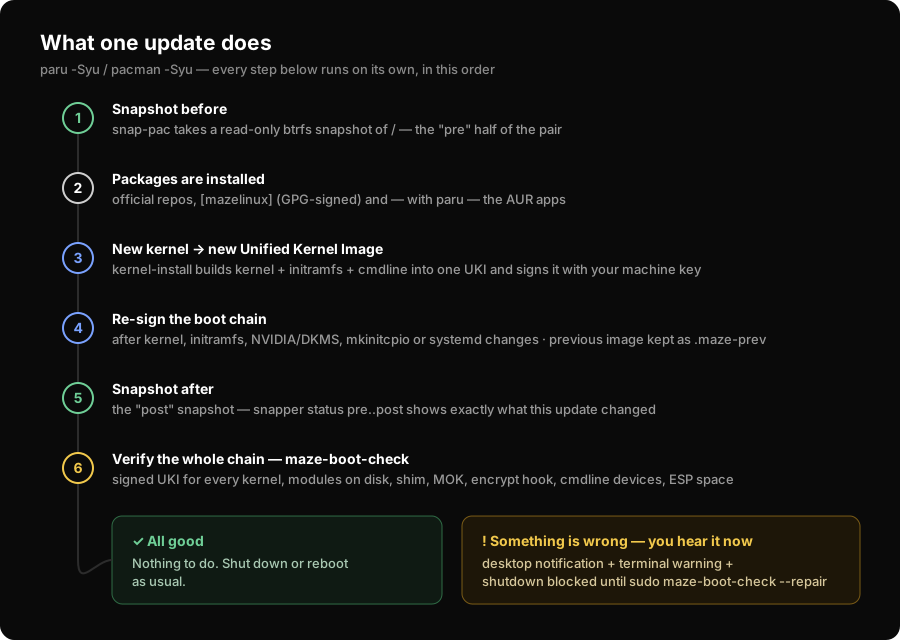
- A btrfs snapshot is taken before and after the transaction (snap-pac)
- If the kernel, initramfs, NVIDIA/DKMS modules or systemd changed, the Unified Kernel Image is rebuilt and re-signed with your machine's key
- The boot chain is verified end to end when the transaction finishes
If something is wrong, the system tells you before you shut down — a desktop notification, a warning on every terminal login, and a shutdown inhibitor (see Diagnostics) — and tells you what the problem is. That ordering matters: a boot problem you learn about while you are still booted is an inconvenience; the same problem discovered at the next power-on is an outage.
If an update breaks something
In rough order of effort:
- Undo the file that changed — Snapshots & Rollback
- Boot the recovery kernel if the machine will not start — If the System Won't Boot
- Ask what happened —
sudo maze-doctor, see Diagnostics
Updating the Maze packages only
Maze's own packages come from the [mazelinux] repository
(https://mazerepo.berkkucukk.com.tr/packages). Every package is GPG-signed and
pacman refuses unsigned ones (SigLevel = Required); the signing key ships in
mazelinux-keyring. A normal update covers them; nothing special is required.
New default apps reach existing machines through maze-meta: it depends on
every package that makes up a Maze system, so when a package is added to the
default set, your next update installs it automatically.
A note on partial upgrades
Do not use pacman -Sy <package> to install a single package against an
un-updated system. On any Arch-based system this produces a partial upgrade and
is a genuine way to break things. Always -Syu.
See also: Kernel Management · Snapshots & Rollback · Known Limitations