Security Reference
Maze Linux enables a layered security stack from first boot. Nothing needs to be turned on manually — every service listed here is active the moment you log in.
Security at a Glance
| Layer | Tool | Version | Status |
|---|---|---|---|
| Mandatory access control | AppArmor | 3.1.7 | Enabled (kernel + service) |
| Host firewall | firewalld | 2.2.3 | Active — strict public zone |
| SSH | sshd (hardened config) | — | Server off by default; root login disabled, 3 auth attempts |
| System audit log | auditd | — | Active — hardened rule set |
| Network attack detection | Maze Guard | — | Autostarted on desktop |
| Antivirus | ClamAV + QLAM | 1.4.1 | On-access scanning + scheduled updates |
| Rootkit detection | rkhunter | — | Baseline database initialized |
| Security audit | lynis | — | Installed |
| Kernel hardening | sysctl (custom) | — | Applied at boot |
AppArmor
AppArmor 3.1.7 is a mandatory access control (MAC) system. It confines applications to only the files, capabilities, and system calls defined in their profile, limiting damage if an app is exploited. Maze ships with enforcement profiles for all major browsers and system services active from first boot.
How it's enabled:
- AppArmor is switched on through the kernel command line, which on Maze is
baked into the signed Unified Kernel Image — there is no bootloader config
to edit. The parameters are:
lsm=landlock,lockdown,yama,integrity,apparmor,bpf apparmor=1 security=apparmor apparmor.serviceis enabled and starts at boot.
Check status:
sudo aa-status
View active profiles:
sudo aa-status | grep enforce
AppArmor profiles shipped with packages are loaded automatically. You can write custom profiles in /etc/apparmor.d/.
firewalld
firewalld 2.2.3 manages the nftables rule set using a zone-based model. The default zone is public with a strict policy — all inbound connections are refused by default. Only traffic initiated by you is permitted outbound.
Check active rules:
sudo firewall-cmd --list-all
Add a port temporarily:
sudo firewall-cmd --add-port=8080/tcp
Add a port permanently:
sudo firewall-cmd --add-port=8080/tcp --permanent
sudo firewall-cmd --reload
GUI: firewall-config (install with sudo pacman -S firewall-config if needed).
auditd
The Linux Audit daemon records security-relevant system calls and file accesses into a structured audit log. Useful for forensics, compliance, and detecting unusual activity.
View recent audit events:
sudo ausearch -ts recent
Search for a specific file:
sudo ausearch -f /etc/passwd
Generate a report:
sudo aureport
Maze ships a hardened rule set covering sensitive paths (/etc/passwd, /etc/shadow, /etc/sudoers) and privilege escalation events. Audit rules live in /etc/audit/rules.d/.
Maze Guard
Maze Guard is Maze's own public Wi-Fi security monitor — a PyQt6 app
backed by maze-guardd.service. It watches the network you are on for
attacks: ARP spoofing and other MITM attempts, rogue gateways, suspicious
traffic patterns. It integrates with firewalld to react.
systemctl status maze-guardd     # the daemon
maze-guardctl                    # command-line control
Maze Guard's GUI autostarts on the desktop.
ClamAV + QLAM
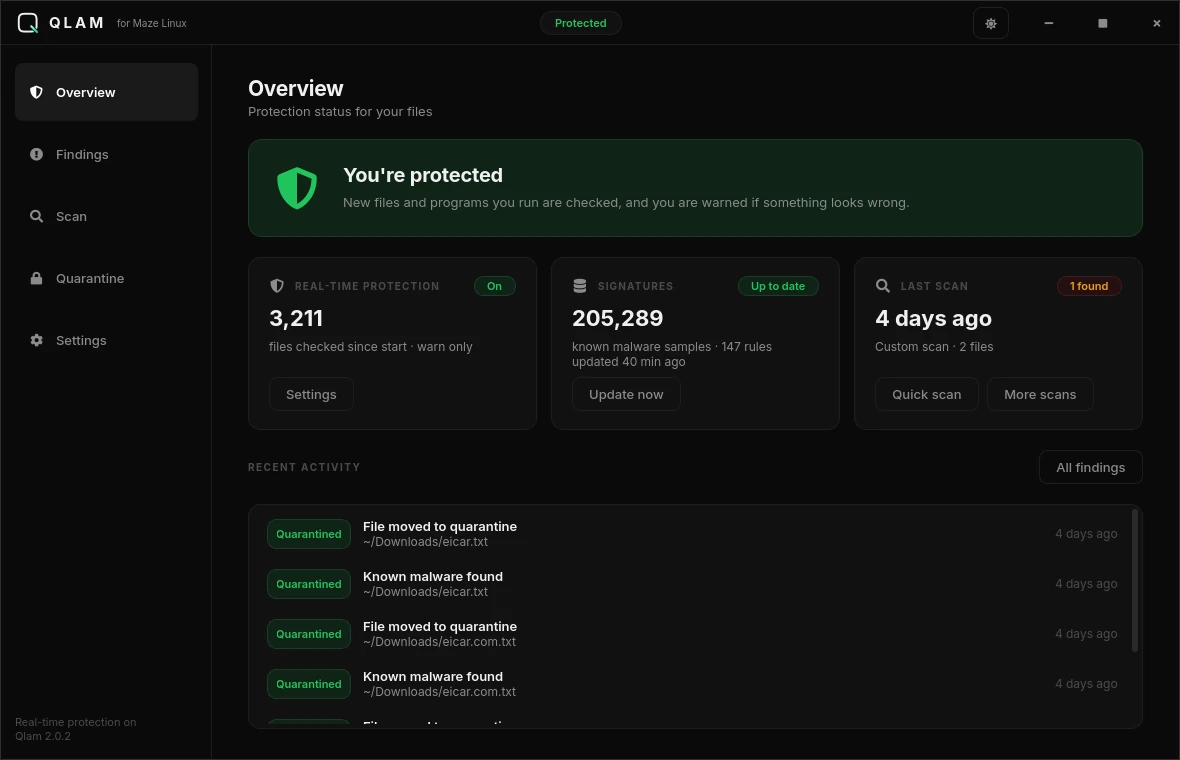
ClamAV is the antivirus engine; QLAM is the Maze-built GUI for it.
What is actually running: only
clamav-freshclamis enabled, which keeps virus definitions up to date on a schedule. The on-access scanner (clamonacc/clamav-daemon) is not enabled — scanning is on demand, either from QLAM or withclamscan/clamdscan.
systemctl status clamav-freshclam   # definition updates
qlam                                # GUI scanner
clamscan -r ~/Downloads             # scan a folder from the shell
clamtk is also installed as a second, lighter GUI if you prefer it.
rkhunter
rkhunter checks for rootkits, backdoors, and local exploits by comparing file hashes and checking for known suspicious patterns.
First run (baseline):
sudo rkhunter --update
sudo rkhunter --propupd
Periodic check:
sudo rkhunter --check
Warnings should be investigated. Many are false positives — --propupd updates the baseline after you verify a change is legitimate.
lynis
lynis performs a comprehensive security audit of your system configuration and produces a hardening score with specific recommendations.
sudo lynis audit system
The report is saved to /var/log/lynis.log and /var/log/lynis-report.dat.
Hardened SSH
The SSH server (sshd) ships with secure defaults:
PermitRootLogin no— root login over SSH is disabled.MaxAuthTries 3— lock out after 3 failed attempts.AllowAgentForwarding no,AllowTcpForwarding no,X11Forwarding no— forwarding disabled.
Switch to key-only authentication:
sudo sed -i 's/#PasswordAuthentication yes/PasswordAuthentication no/' /etc/ssh/sshd_config
sudo systemctl restart sshd
The SSH server is not enabled at boot by default. Enable it only when needed:
sudo systemctl enable --now sshd
Disable again when not in use:
sudo systemctl disable --now sshd
Kernel Hardening (sysctl)
Maze applies kernel parameters at boot via /etc/sysctl.d/99-maze-hardening.conf. These are active from first boot — no action required.
Kernel restrictions
| Parameter | Value | Effect |
|---|---|---|
kernel.kptr_restrict | 2 | Hides kernel pointers from all users |
kernel.dmesg_restrict | 1 | Only root can read dmesg |
kernel.yama.ptrace_scope | 1 | Restricts ptrace to parent/child processes |
kernel.unprivileged_bpf_disabled | 1 | Only root can load eBPF programs |
net.core.bpf_jit_harden | 2 | Hardens the eBPF JIT compiler |
kernel.kexec_load_disabled | 1 | Disables loading a new kernel at runtime |
kernel.sysrq | 4 | Limits SysRq to safe keys only |
fs.suid_dumpable | 0 | Disables core dumps from setuid programs |
fs.protected_hardlinks | 1 | Prevents hardlink attacks in shared dirs |
fs.protected_symlinks | 1 | Prevents symlink attacks in shared dirs |
fs.protected_fifos | 2 | Blocks FIFO attacks in world-writable dirs |
fs.protected_regular | 2 | Blocks regular-file attacks in world-writable dirs |
dev.tty.ldisc_autoload | 0 | Stops automatic TTY line-discipline loading |
Network protections
| Parameter | Value | Effect |
|---|---|---|
net.ipv4.conf.all.rp_filter | 2 | Reverse-path filtering, loose mode — deliberate, so VPN and Tor routing keep working |
net.ipv4.tcp_syncookies | 1 | SYN flood protection |
net.ipv4.conf.all.accept_redirects | 0 | Ignores ICMP redirect packets |
net.ipv4.conf.all.send_redirects | 0 | Does not send ICMP redirects |
net.ipv4.conf.all.accept_source_route | 0 | Rejects source-routed packets |
net.ipv4.icmp_echo_ignore_broadcasts | 1 | Ignores broadcast ping (smurf mitigation) |
net.ipv4.conf.all.log_martians | 1 | Logs packets from impossible addresses |
net.ipv4.conf.default.log_martians | 1 | Same, for new interfaces |
net.ipv4.conf.{all,default}.secure_redirects | 0 | Ignores even "secure" ICMP redirects |
net.ipv4.icmp_ignore_bogus_error_responses | 1 | Drops malformed ICMP errors |
net.ipv6.conf.{all,default}.accept_redirects | 0 | IPv6 equivalents of the above |
net.ipv6.conf.{all,default}.accept_source_route | 0 | Rejects source-routed IPv6 packets |
The
net.ipv4.conf.default.*counterparts of theall.*entries above are set too, so interfaces appearing later inherit the same policy.
Maze Control Center — Security Tab
Open maze-control-center and select the Security tab to see the live status of every service listed here. Each service shows green (active) or red (inactive). Copyable commands let you start, stop, or enable any service from the terminal without memorizing systemctl syntax.